Chatbot Overview
Chatbots can be Rule-Based or Conversational. Rule-based chatbots are those that interact with the user in a deterministic way, such as with the help of buttons, form elements, widgets, etc. Whereas conversational bots take user input in natural language, which bot then understands and generates responses with the help of NLP/AI techniques. A typical chatbot solution comprises the following components:
Chat Interface: From where the end users can interact. There are plenty of popular interfaces available such as WhatsApp, Telegram, Line, etc. Swiftchat is one of them but it’s novel for hosting bots.
Chatbot Backend: Responsible for handling user inputs received from the Chat interface and responding accordingly.
NLP Services: Utlised for user’s intent classification and response generation. It processes user queries using natural language processing techniques when the user communicates in natural language.
Database: Stores user data, manages knowledge, and maintains chat history and logs
Chatbot Flow
A typical Conversational AI bot flow looks like as follows:

When a user types a text into the Chat interface, it goes to the Chatbot Backend where it extracts the Intent and Entities from the text with the help of NLP services. Based on extracted intent, the appropriate business logic will be executed. E.g. in a typical customer service bot, a user may ask “Can you provide me the status of my loan application ID 12345”. In this example, the user intent is “Get Application Status”, entity is “Application ID: 12345”. Hence business logic related to retrieving application status will get executed. Once retrieved, the NLP service again is required to generate response in natural language.
Architecture
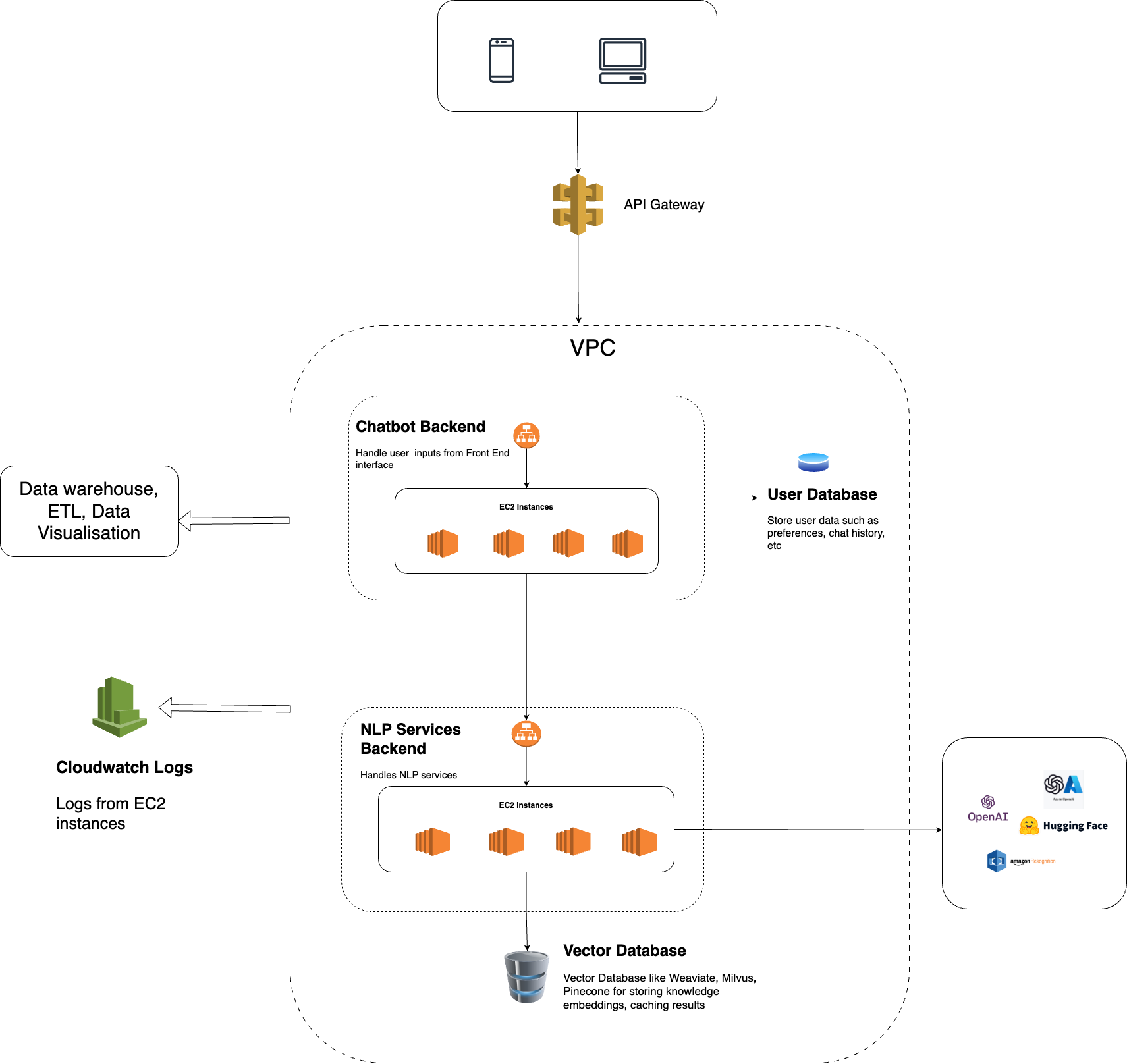
A typical Chatbot architecture can be visualized on AWS as follows:
Chatbot Backend
The Chatbot Backend serves as the core application responsible for managing user interactions on the Swiftchat Platform. Its key responsibilities include:
Implementing logic for various use cases
Utilizing Swiftchat APIs to engage with users
Leveraging NLP Backend services for natural language query processing
Managing user preferences and chat history
This backend suffices for Rule-Based bots where natural language processing is unnecessary.
NLP Backend Services
This module handles natural language queries using generative AI technologies such as OpenAI <https://openai.com/> or open-source LLMs <https://huggingface.co/models>. Its typical services include:
Ingesting and managing knowledge within the Vector database
Generating responses to queries posed in natural language using LLM services like OpenAI <https://openai.com/>.
Caching results to optimize LLM service costs
Database
The database is used to store bot knowledge data, user data, chat history, analytics, etc. Hence for different use cases, different types of databases are utilised. For e.g. to store user data SQL/NOSQL databases such as MySQL or MongoDB can be used. To store bot knowledge data, a vector database is the ideal choice as it stores data in a format that is understandable by Machine Learning Models. In conversational bots, we utilize Vector databases such as ChromaDB, Weaviate, Milvus, Pinecone, etc. to store text embeddings (Vectors) of all textual/multi-media data as Knowledge store, which then will be queried by bot logic for different use cases.
For building a Conversational Chatbot we typically build the knowledge store by generating text embeddings and indexing Documents such as PDFs, text files, and strings, serving as knowledge for bot responses. Furthermore, vector db is also used as a cache to store LLM-generated responses in order to optimize latency and LLM usage cost.
Logging, Health Check, Data Analytics
It is also necessary to keep monitoring the chatbot performance in real-time for various aspects such as the quality of bot response for each user query, overall system performance and to analyze user behavior. AWS CloudWatch facilitates monitoring infrastructure health, including server logs and resource utilization.
An Alarm service can be set up to receive alerts for unexpected issues. Key metrics to monitor include:
EC2 Instances Utilization
Request Counts